Pro Tools sampler
A GrooveCell Alternative for Pro Tools
GrooveCell is a 16-pad drum machine. If what you want is to load one sample and play it chromatically from MIDI, Core Sampler is the simpler AAX alternative for Pro Tools on macOS.
Quick answer: GrooveCell is a virtual drum machine built around 16 pads and a step sequencer. It is very good at that job. It is not built for taking one sound and playing it melodically across the keyboard. If that is what you are looking for, Core Sampler is the focused AAX alternative: load a sample, play it chromatically from MIDI, and shape it with the essentials.
Building a kit: kick, snare, hats, percussion, each on its own pad, sequenced into a beat. GrooveCell is already the right tool, and it is included with Pro Tools subscriptions.
Playing one sound: a vocal chop, a bass hit, a texture, or a found sound that needs to become a pitched, playable part. That is a different shape of instrument.
What GrooveCell is actually built for
Avid describes GrooveCell as a virtual drum machine and sequencer for creating beats and drum patterns in Pro Tools. It centres on a classic 16-pad layout with 16 sample slots, and each pad can layer up to three samples. It adds a 32-step sequencer, per-pad audio routing across up to 16 channels, built-in reverb, delay, EQ, distortion and compression, and texture emulations of classic drum machines. You can load your own samples and build a custom kit. GrooveCell and its Sonic Drop content are included with Pro Tools Artist, Studio and Ultimate subscriptions and active update plans.
That is a lot of instrument for free, and none of it is the problem. The problem people run into is a shape mismatch: a pad grid assumes the musical unit is a kit of different sounds. Some of the time, the musical unit is one sound.
Where a pad grid gets in the way
Say you have a single vocal chop, a plucked note, a piece of foley, or a bass one-shot, and you want to play a melody or a bassline with it. On a pad instrument that means assigning the same sample to several pads and transposing each one by hand, or committing the part to audio clips on the timeline and editing every copy. Both routes make the sound and the performance hard to separate again. Change your mind about the sample and you rebuild the part.
A chromatic single-sample instrument inverts that. One sample is mapped across the MIDI keyboard, so the performance lives in MIDI and the sound stays swappable.
GrooveCell vs Core Sampler
| GrooveCell | Core Sampler | |
|---|---|---|
| Built around | A 16-pad kit and a 32-step sequencer | One sample played chromatically from MIDI |
| Best for | Drum programming, beats, layered kit design | Turning a found sound into a playable part quickly |
| Melodic playing | Possible, but you are transposing pad by pad | The default behaviour |
| Swapping the sound | Per pad, within the kit | Drop in a new sample; the MIDI part stays intact |
| Effects and sequencing | Built-in FX, step sequencer, multi-channel routing | None. Use Pro Tools' own MIDI and plugins |
| Cost | Included with Pro Tools subscriptions | $24 one-time through Oct 31, then $39 |
What Core Sampler does instead
Core Sampler is deliberately narrow. Drag or load one sample, play it across the keyboard from MIDI, then set the start and end points, tuning and transpose, filter, amp envelope, fades and gain. That is the whole instrument. It is AAX for Pro Tools on macOS, a universal build that runs natively on Intel and Apple Silicon. Loading from disk and dragging from Finder or the Workspace browser work across supported Pro Tools versions; dragging a clip straight from the Edit Window needs Pro Tools 2024.10 or newer.
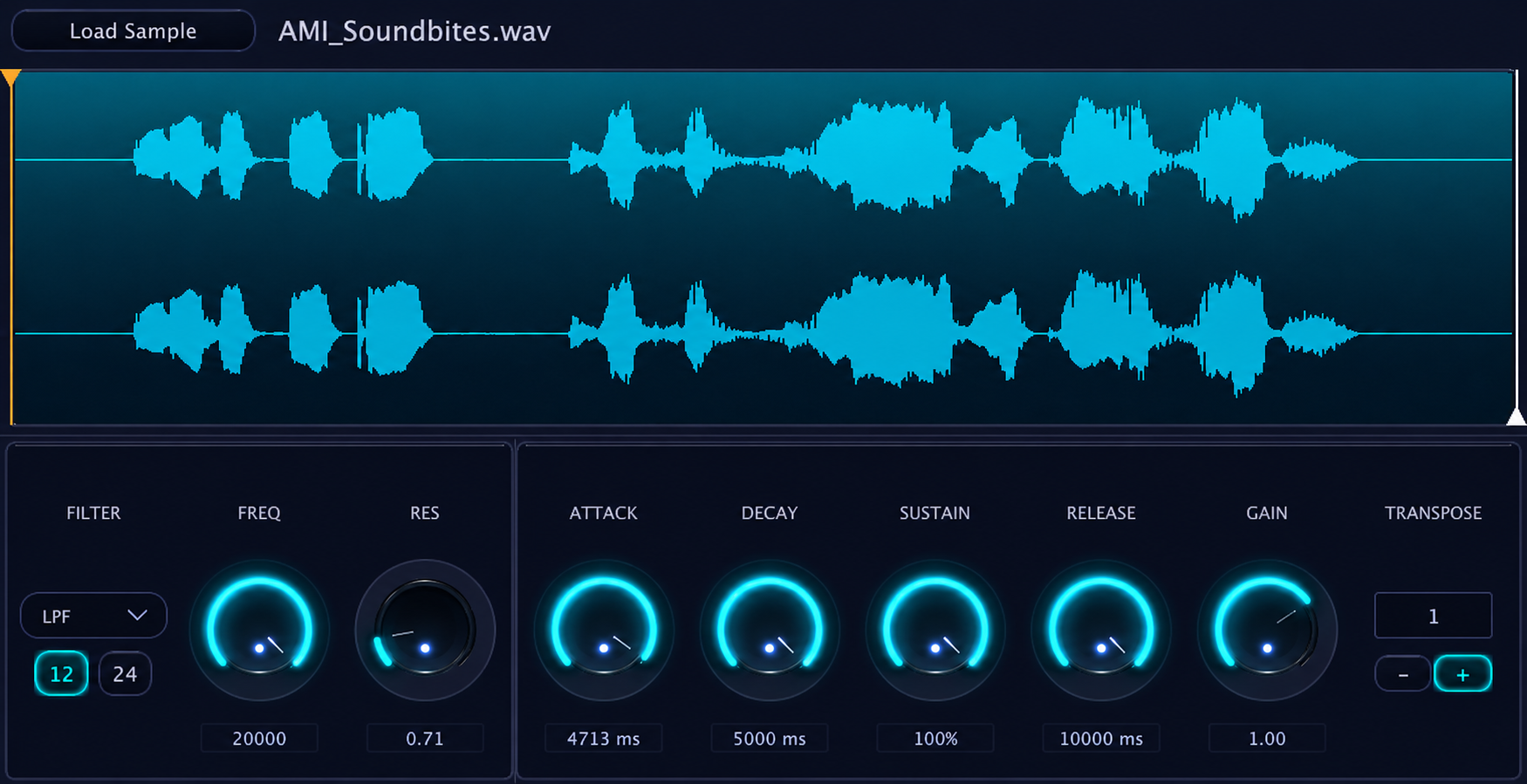
It does not slice, warp, host sample libraries, run a sequencer, or build kits. If you need any of those, GrooveCell or a larger sampler is the better answer.
You probably want both
This is not a replacement argument. Most Pro Tools sessions have room for a drum instrument and a fast single-sample instrument, because they solve different problems. Keep GrooveCell for kits and beats. Reach for Core Sampler at the moment you have one sound and want it playable before the idea cools off.
If you want the wider field first, see our comparison of Pro Tools sampler plugins, or the step-by-step guide to playing a one-shot chromatically in Pro Tools.
Frequently asked questions
Is GrooveCell free?
GrooveCell and its Sonic Drop content are included with Pro Tools Artist, Pro Tools Studio and Pro Tools Ultimate subscriptions, and with active 1-Year Software Updates + Support Plans. Check Avid's current terms for your own plan.
Can GrooveCell play a sample chromatically?
GrooveCell is designed around 16 pads rather than a chromatic keyboard map, so playing one sound melodically means assigning and transposing it across pads. A single-sample instrument such as Core Sampler maps one sound across MIDI notes by default.
Can I load my own samples into GrooveCell?
Yes. Avid states you can build a custom drumkit from your own samples, with up to three layered per pad.
Is Core Sampler a GrooveCell replacement?
No, and it is not trying to be. GrooveCell is a drum machine with a sequencer and built-in effects. Core Sampler covers the narrower job of making one sample playable from MIDI fast. Many people use both.
Does Core Sampler work on Windows?
Not yet. Core Sampler is currently a macOS AAX plugin for Pro Tools, with a universal Intel and Apple Silicon build.
What does Core Sampler cost?
$24 as a one-time purchase through Oct 31, then $39. No subscription, and a no-questions refund if it is not a fit.
Sources
GrooveCell, Pro Tools and AAX are trademarks of Avid Technology, Inc. Coretone is not affiliated with or endorsed by Avid. Product features and bundling change over time — verify current details on Avid's site.